![Pro Quick Draw Logo_Grey.png]](https://www.proquickdraw.com/hs-fs/hubfs/Marketing%20Photos/Pro%20Quick%20Draw%20Logo_Grey.png?height=40&name=Pro%20Quick%20Draw%20Logo_Grey.png)
What is it?
Note: Only the designated Account Owner can manage Users and Licenses. Need to change Account Owners? Please email support@proquickdraw.com
The PQD Dashboard is your one-stop shop as an Account Owner to manage all of your licensed and non-licensed users that have access to Pro Quick Draw Products such as: Playbook, Play Editor or Cutup Generator, etc.
Why does it matter?
User and license management is a key responsibility of every Account Owner. The PQD Dashboard helps you make the most of your purchased licenses by ensuring they are actively in use and properly managed. It also enables you to be a good steward of your licenses by removing or reassigning them when coaches leave the organization or move to a new device.
How does it work?
Under the Users section of the dashboard click the Add User button

Type in the user information and choose the role(s) that they will assume
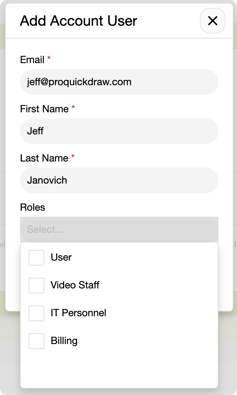
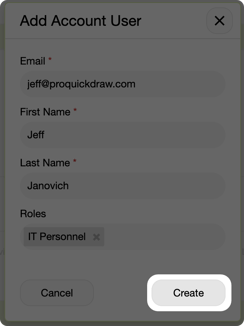
Click the Create button
Not all users will require an actual PQD license if they are strictly in the dashboard managing users and assigning licenses as an admin.
If they do need a license and you now have them added, here are the steps to assign that coach a PQD license to use the actual product.
Under the Pro Quick Draw Licensed Users section click on the Add Licensed User button

Select the user you want to assign a license
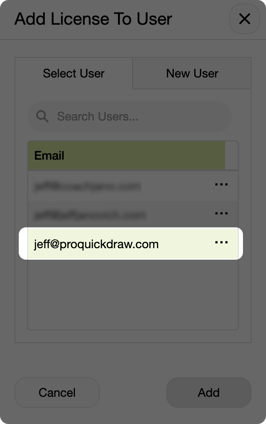
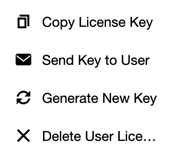
Now this user will be assigned a license. You can click on the 3 dots next to that user and choose Send Key to User which will send it via email, or you can Copy License Key if you are doing this directly on that users computer to paste it in the activation field in the product

What is Next?
You may also need to know how to delete a user and/or a license. Click the link below to learn how the next phase of a user lifecycle within the PQD Dashboard