What is it?
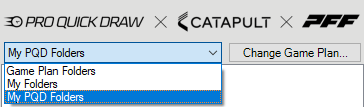
This is a feature within the dropdown area of the Catapult Integration where users can select one of the following:
Game Plan Folders: Displays all of the folders within the Game Plan
My Folders: Displays all of the folders within the users My Folders
My PQD Folders: Displays the Folders/Cutups of the users choice selected within PQD.
Why does it matter?
Given the extensive amount of video data within a Game Plan, we sought to provide a more efficient way for coaches to access the video playlists they require each week, without the need to sift through all the cutups. By selecting their My PQD Folders weekly, coaches can retrieve the necessary information more swiftly than in previous seasons.
How does it work?
- Select your Game Plan and find your desired folder/cutup.
- Right Click the Cutup and Select Add to My PQD Folders.
- Choose the Dropdown and select My PQD Folders to access to material.

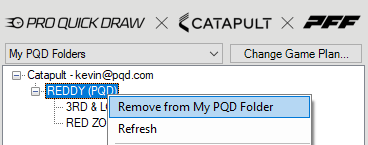
- To remove a cutup or a folder, right click within the same menu and select remove.